
What Is Clipping Path in Photo Editing — And Why It Matters More Than You Think
Demystifying the Clipping Path
If you’ve ever bought a product online and noticed how clean the image looked, with the subject perfectly separated, the background gone, and the edges sharp, there’s a good chance clipping path was involved in getting it there.
It’s one of those techniques that most people never think about, but it’s embedded in nearly every professional product photo you see. The cleaner the image, the more invisible the work behind it. And that’s kind of the point.
Understanding what clipping path is in photo editing isn’t just useful for editors. It’s genuinely valuable for ecommerce brands, photographers, and business owners who want to know what they’re paying for and why image precision affects more than just aesthetics.
This guide walks through everything: what clipping path actually is, the different types, where it’s used, and what separates a well-executed clipping path from a lazy one. Let’s get into it.
What Is a Clipping Path in Photo Editing?
A clipping path is a vector-based outline drawn around a subject in an image to separate it from its background. Once that path is closed, everything inside becomes visible, and everything outside gets removed or hidden. The result is a clean, isolated subject that can be placed on any background, resized without quality loss, or used in product catalogues, advertisements, websites, and print materials.
The technique is done using the Pen Tool in Adobe Photoshop, and it requires genuine precision. A clipping path doesn’t guess or use automated selection. It traces the exact edge of a subject manually, anchor point by anchor point. That level of control is what makes it the preferred method for product photography where accuracy isn’t optional.
In simple terms, if you want a product image with a perfectly clean edge and zero background noise, a clipping path is typically how professionals get there.
What Is a Clipping Path Service?
A clipping path service refers to professional photo editing work where trained editors manually create clipping paths around subjects in images, usually product photos, and deliver the cutout in the format a client needs.
For most businesses, this means sending raw product images and receiving back polished, background-free versions ready for their website, Amazon listing, print catalogue, or marketing materials. The quality depends entirely on how precisely those paths are drawn.
At Clarity Edit, clipping path work is done by experienced editors who understand the difference between a clean edge on a simple bottle and the careful attention a textured shoe or layered garment requires. The technique stays the same; the complexity changes.
The Different Types of Clipping Path (And When Each One Applies)
Not every product photograph needs the same approach. The complexity of the subject determines which type of clipping path is appropriate, and understanding the differences helps you know what you’re actually ordering when you work with an editing service.
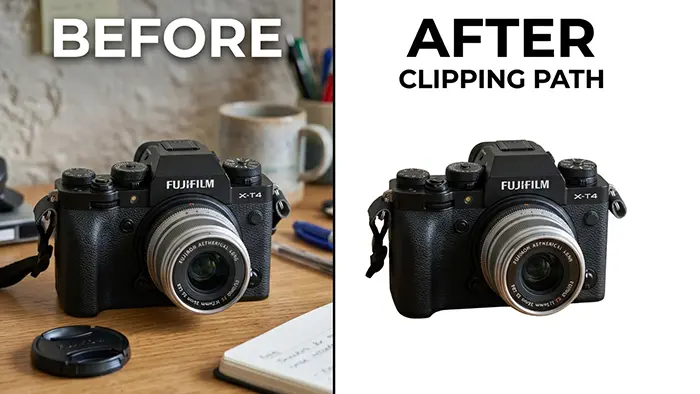
Simple Clipping Path
Used for products with smooth, clear edges and no internal cutouts. Examples include mugs, balls, books, boxes, and mobile phones. The path follows a single clean outline with few curves and no complicated details. It’s the fastest type to complete, which usually makes it the most affordable.
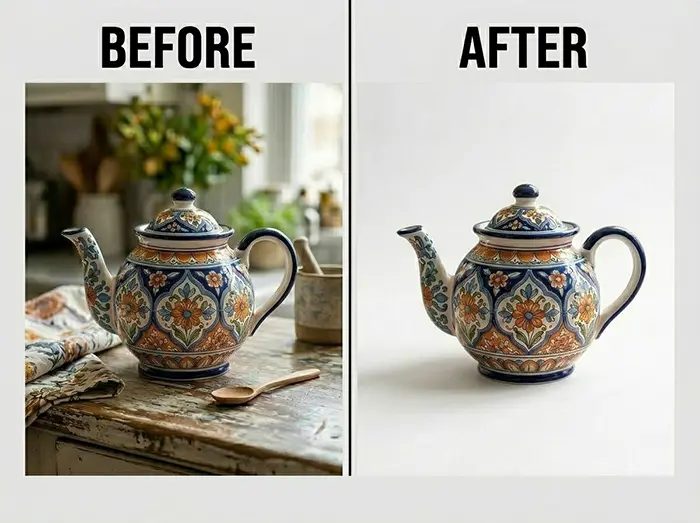
Compound Clipping Path
Applied when a product has holes, gaps, or internal areas that also need to be cut out, such as sunglasses, rings, chairs with open frames, or bicycle wheels. These require multiple paths, one for the outer edge and others for interior cutouts. This process is more complex, but still manageable with skilled hands.
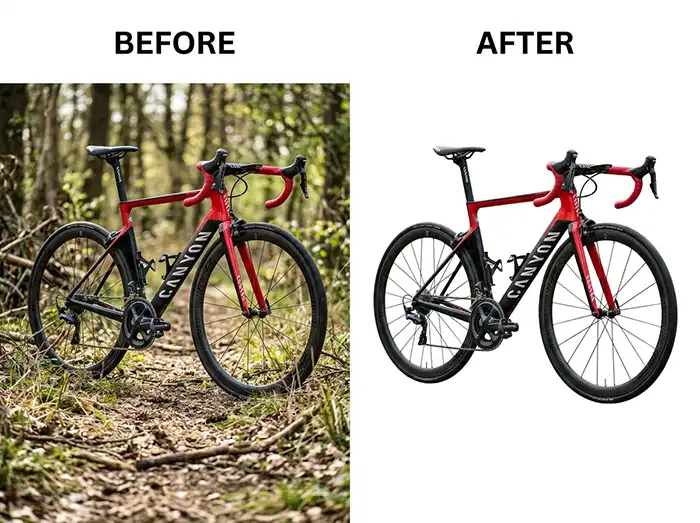
Complex Clipping Path
Reserved for subjects with intricate details, such as fur coats, wicker furniture, textured products, and items with intricate patterns or irregular shapes. These paths can have hundreds of anchor points. Rushing them shows, and you end up with halos, jagged edges, or lost texture detail. This is where the gap between a skilled editor and an average one becomes very visible.
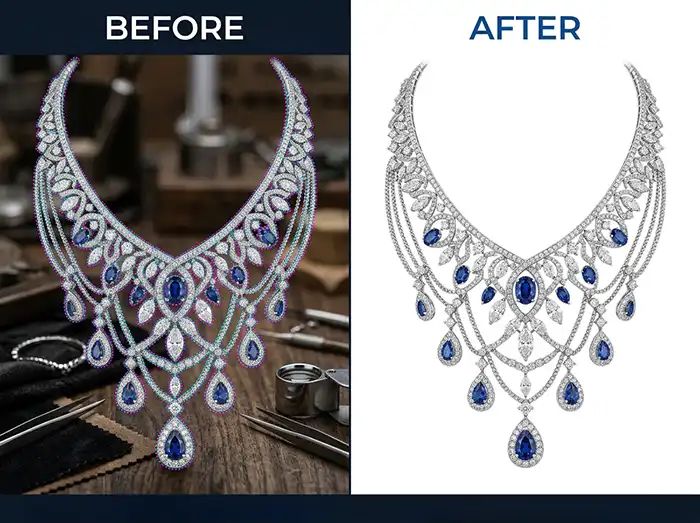
Super Complex Clipping Path
The most demanding category. This includes layered jewellery with fine chains, highly detailed fabrics, or groups of products with overlapping edges. At this level, image masking often works alongside clipping paths to handle areas where a hard edge simply doesn’t exist.
What Is the Purpose of Clipping Path?
The short answer is control. A clipping path gives you precise control over what appears in an image and what doesn’t.
For ecommerce, that control translates into cleaner product listings, consistent image presentation across an entire catalogue, and the ability to place any product on any background. You can use white for Amazon, lifestyle backgrounds for Instagram, or transparent PNGs for web design. The product itself stays sharp, consistent, and professional regardless of context.
Beyond background removal, clipping paths also serve colour correction workflows. Editors can apply adjustments to isolated areas of an image, which is especially useful when a product needs colour-graded editing without affecting the background or surrounding elements.
The deeper purpose, though, is visual trust. A product image where the cutout is clean and the edges are accurate signals professionalism. A product image with rough edges, halos, or uneven masking quietly erodes confidence, even for shoppers who couldn’t name exactly what bothers them about it.
Real-World Uses of Clipping Path in Photo Editing
Understanding where clipping paths are actually used helps clarify why the technique matters so much beyond just removing backgrounds.
Ecommerce Product Photography
The most common application. Amazon, Shopify, eBay, and Etsy all have image standards, and many require white or transparent backgrounds. Clipping paths are the standard method for achieving this consistently across hundreds or thousands of SKUs.
Fashion and Apparel Editing
Fashion brands use clipping paths to isolate clothing items for lookbooks, size guides, and product pages. The ghost mannequin technique, which creates the hollow-body effect in garment photos, relies heavily on precise clipping path work to remove mannequins seamlessly.
Jewellery Photo Editing
Jewellery is one of the most demanding clipping path applications. Chains, prongs, stones, and reflective surfaces require meticulous paths to look polished rather than carved out. A well-executed jewellery clipping path preserves the sparkle and texture that makes a piece worth buying.
Advertising and Marketing Materials
Print ads, banner campaigns, and promotional materials often need product images extracted and placed into custom design layouts. Clean clipping paths make that integration seamless.
Catalog and Print Production
Publishers and retailers creating catalogs need consistent, isolated product images that can be placed on designed templates. Sloppy paths become very obvious in print at high resolution.
How Do Editors Actually Create a Clipping Path?
The process is more methodical than it sounds. Here’s what actually happens in a professional editing workflow:
1. Open the image in Adobe Photoshop and assess edge complexity before starting.
2. Select the Pen Tool (P), which is the standard tool for precise vector path creation.
3. Zoom in significantly. Professional editors work at 200% to 400% zoom to see exactly where the subject edge falls.
4. Place anchor points carefully around the subject’s edge, curving the path to follow curves and using straight segments on flat lines.
5. Close the path once the entire subject outline is traced.
6. Convert the path to a selection or apply it directly as a clipping mask.
7. Refine as needed by checking edges, removing fringing, and adjusting stray pixels.
8. Export in the required format, which is usually PNG for a transparent background, TIFF, or PSD.
The total time depends entirely on subject complexity. A simple mug might take 5 to 10 minutes. A detailed piece of jewelry with fine chains could take 30 to 45 minutes or more per image.
What Separates a Good Clipping Path From a Poor One
This is worth understanding, especially if you’re comparing editing services. The difference isn’t always visible in a thumbnail. It shows up when you zoom in.
Edge accuracy: Does the path follow the true edge of the subject, or is there a pixel gap, a missed curve, or a visible halo from the original background?
Fringe removal: When an image is shot against a light background and the clipping path removes it, sometimes residual background colour bleeds into the subject edge. Good editors catch and remove this.
Smooth curves: Jagged anchor points on curved areas create unnatural, choppy edges. A properly trained editor knows when to use smooth curve handles and when to use corner points.
Consistent quality across batches: For ecommerce brands processing hundreds of images, consistency matters as much as individual quality. An isolated great result doesn’t help if other images in the same batch look different.
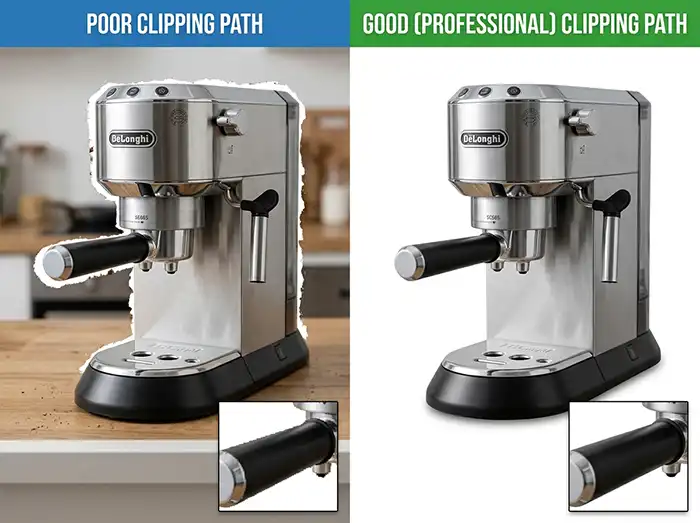
At Clarity Edit, quality checks happen at multiple points in the editing workflow, not just at delivery. That’s the kind of detail that protects your brand’s visual consistency.
Clipping Path vs. Image Masking: When to Use Which
One question that comes up often is why image masking exists if clipping path is so precise.
The answer is simple. Clipping path works brilliantly for subjects with defined, hard edges. But some subjects don’t have hard edges. Hair, fur, smoke, transparent fabric, and fine wisps of fringe will look flat and artificial if you try to trace them with a pen tool.
Image masking, specifically layer masking or channels-based masking, handles soft, complex edges far better. It preserves natural transitions rather than cutting hard outlines where none exist.
In practice, skilled editors often combine both. A clipping path handles the clear structural edges of a product while masking refines the soft or complex areas. For something like a model wearing a fur-trimmed jacket, you’d typically see both techniques used on the same image.
Common Clipping Path Mistakes (And What They Cost You)
Choosing the lowest price without checking quality standards
Cheap clipping path services often use less experienced editors or automated tools that miss details. The photos might look acceptable at thumbnail size and fall apart when zoomed in, or worse, when printed. The cost of re-editing or losing customer trust is always higher than the cost of getting it right the first time.
Using automated selection tools for complex products
Photoshop’s Magic Wand, Select Subject, and Quick Selection tools are useful for rough cuts, but they’re not replacements for a manual clipping path on detailed products. They make assumptions the software can’t validate. For professional product photos, manual pen tool paths remain the gold standard.
Ignoring edge refinement after the path is applied
Drawing the path is only part of the work. Without edge cleanup, including removing fringing, adjusting transparency on semi-transparent areas, and smoothing micro-details, the final image still looks unfinished.
Not specifying the output format
Transparent PNGs, white background JPEGs, layered PSDs, and TIFFs are all options, and the right format depends on where the image is going. Not communicating this clearly upfront often leads to extra revision rounds.
Assuming all products need the same complexity tier
Sending all your images as one batch without flagging complex items often results in uniform pricing that either overcharges simple images or underserves complex ones. A good editing service will assess and categorize for you, but communicating complexity upfront always speeds things up.
Professional Tips for Better Clipping Path Results
- Shoot with clipping path in mind. A clean, contrasting background, especially a pure white or grey studio setup, makes the editor’s job significantly easier and your final result significantly cleaner. The better the source image, the better the output.
- Provide high-resolution files. Low-resolution images limit how much detail an editor can preserve along edges. When fine detail matters for items like jewellery, texture, and fine fabric, resolution directly affects the quality of the outcome.
- Request layered PSDs when you want flexibility. If you need to place the product on different backgrounds in the future, having a PSD with the clipping path preserved lets you reuse the edited file without re-ordering.
- Communicate the use case. An image for Amazon requires a specific white background specification. An image for a print catalogue has different resolution and colour mode requirements. Telling your editing service where images are going helps them deliver correctly formatted files the first time.
- Batch consistently. For catalogue work, sending images in organized batches grouped by product type or background consistency improves turnaround and consistency across your catalogue. It lets editors establish a visual rhythm and catch inconsistencies before delivery.
The Bottom Line on Clipping Path
Clipping path isn’t a complicated concept once you understand what it’s actually doing. It creates a precise boundary around a subject so everything unnecessary can be removed. But the simplicity of the idea doesn’t reflect the skill it requires in practice.
Done well, it’s invisible, which is exactly how it should be. Your customers see a clean, professional product image. They don’t see the editor who spent careful minutes tracing every curve, checking every edge, and refining what the automated tools couldn’t catch.
That’s where professional clipping path services earn their value. They don’t just remove backgrounds; they do it with the precision that protects your product presentation and makes your catalogue look like it belongs among your competitors’ best work.
If you’re unsure whether your current images are getting the quality they deserve, or if you’re building out a product catalogue and want to do it right from the start, understanding what clipping path is in photo editing is the first step. The next step is working with editors who take it seriously.
Ready to See What Professional Clipping Path Work Actually Looks Like?
At Clarity Edit, we handle clipping path projects of every complexity level, from straightforward product cut-outs to demanding jewellery and apparel editing. Our editors work with precision, communicate clearly, and deliver results that hold up under zoom.
Get Your Free Quote Today →. Send us your sample images and we’ll assess the complexity, turnaround time, and pricing with no commitment required.
Or, if you want to talk through your specific project first, Contact Our Team. We’re happy to help you figure out exactly what your images need.
Frequently Asked Questions
Background removal is the outcome, meaning the final result you see when a background is gone from an image. Clipping path is one of the main methods used to achieve that result. It’s a vector path drawn around a subject that defines precisely where the image ends and the background begins. So, clipping path is the technique, and background removal is what it produces.
Clipping path works best on subjects with clear, defined edges like products, hard goods, most apparel, and vehicles. For subjects with soft, complex edges like hair, fur, feathers, or translucent fabrics, image masking techniques typically produce more natural results. In many professional workflows, both methods are used on the same image.
It depends heavily on complexity. A simple product with smooth edges might take 5 to 10 minutes per image. Complex items like detailed jewelry, layered garments, or products with intricate shapes can take 30 minutes or more per image. For large batches, professional services have established workflows to handle volume efficiently without sacrificing quality.
No, and this distinction matters. The “Remove Background” button in Photoshop uses automated AI detection, which works reasonably well for simple images but frequently struggles with edges, fine details, and complex subjects. A manual clipping path drawn with the Pen Tool is far more precise and consistent, especially for professional ecommerce and catalog work where accuracy is non-negotiable.
The most common delivery formats are PNG for a transparent background, JPEG for a white or solid background, TIFF for print workflows, and PSD, which is a layered Photoshop file with the path preserved for future use. The right format depends entirely on where you’re using the image. A good editing service will ask about your use case upfront and deliver accordingly.