
Ecommerce Product Background Removal: A Practical Guide for Online Sellers
The Real Purpose of Ecommerce Product Background Removal
Nearly every online seller faces this at some point. You upload a product listing expecting sales, but the clicks never come. The product is good. The price is competitive. Yet buyers keep scrolling. Often, the problem isn’t the product itself. It’s the image.
Background removal is often the fix, but not in the way most guides describe it. It’s not just about making images look cleaner. It’s about meeting platform requirements, building buyer trust, and keeping your entire catalog visually consistent as it grows. This guide covers all of that, including the parts most tools and tutorials skip entirely.
What Background Removal Actually Does for Ecommerce
Background removal isolates your product from whatever was behind it when the photo was taken. The result is either a transparent image (PNG with no background) or a product placed onto a solid color, typically white.

For ecommerce specifically, this matters for two distinct reasons.
The first is compliance. Most major marketplaces enforce specific image standards, and a cluttered or colored background can lead to listing issues. The second is perception. Buyers often form their first impression of a product through its images. A clean, professionally edited image signals quality before a buyer reads a single word of your description.
These two reasons are connected. A listing that fails compliance never gets seen. A listing that passes compliance but uses poor images gets seen and still fails to convert. Background removal addresses both problems at once when it’s done correctly.
Marketplace Image Requirements: What You’re Actually Working Toward
Before you touch a single image, it helps to know exactly what each platform requires. These standards are stricter than most sellers realize.
Amazon requires that main product images use a pure white background, defined as RGB 255,255,255. The product must fill at least 85% of the image frame. No watermarks, text overlays, logos, or props. Additional images allow more flexibility, but the main image has zero tolerance for deviation. Even slight variations from pure white may create compliance issues, so sellers are generally advised to check background color values carefully before uploading.
eBay recommends white or light neutral backgrounds for main images, though enforcement is less automated than Amazon. Images must be at least 500 pixels on the longest side, with 1600 pixels recommended for zoom functionality.
Etsy gives sellers more creative flexibility, but product images still perform better with clean, uncluttered backgrounds. Etsy recommends images of at least 2000 pixels on the shortest side, with a 1:1 aspect ratio for thumbnails.
Shopify has no mandated background standard, but its own research indicates that stores using consistent white or neutral backgrounds across product listings see higher add-to-cart rates than stores with inconsistent imagery.
Walmart Marketplace follows similar rules to Amazon: white or off-white backgrounds for main images, minimum 1000 x 1000 pixels, no props or lifestyle elements on the main image.
The practical takeaway here is that if you’re selling across multiple channels, designing for Amazon’s strictest standard ensures compliance everywhere else. A pure white RGB 255,255,255 background on a high-resolution image satisfies every major platform simultaneously.
The Problem Nobody Talks About: Catalog Consistency
Individual image quality gets most of the attention, but catalog consistency is where many growing sellers start to lose ground.
When a buyer visits your store and sees products photographed at different zoom levels, with different shadow treatments, under different lighting conditions, and against backgrounds that are subtly different shades of white or gray, something registers as off even if they can’t articulate why. The store doesn’t feel professional. Trust erodes.
This becomes a bigger problem as catalogs scale. If you’re editing images one at a time, using different tools or different settings each session, inconsistency compounds with every new product. By the time you have 200 SKUs, the catalog tells a fragmented story.
The solution isn’t just removing backgrounds. It’s establishing a consistent editing standard before you scale, not after. That means deciding on a fixed canvas size, a fixed background treatment, a fixed product-to-frame ratio, and a fixed shadow or no-shadow approach, then applying that standard to every image in the catalog.
This is harder to do retroactively. Addressing catalog consistency as an afterthought means re-editing hundreds of images to bring older listings in line with newer ones, and that cost in time or money adds up quickly.
Choosing Your Approach: When to Use Each Method
There are three practical options for background removal: AI-powered tools, manual editing in software like Photoshop, and outsourcing to a professional editing service. Each serves a different situation.

AI tools (Remove.bg, Photoroom, Canva’s background remover, and similar) are fast and affordable. For simple product categories, such as apparel laid flat, shoes, hard goods, and most packaged products, AI tools produce results that are good enough for most platforms. The major limitation is edge cases. AI tools struggle with fine detail, such as jewelry chains and earring hooks, and with products that have semi-transparent elements like glassware or clear packaging. They also struggle with images shot on backgrounds that are too close in color to the product itself.
Manual Photoshop editing using the pen tool or channel masking produces the highest-quality results for complex images. It’s appropriate when product details are intricate, when the product has hair or fur texture, or when the image will be used for print materials where pixel-level precision is required. The tradeoff is time: manual clipping typically takes ten to thirty minutes per image depending on complexity.
Professional editing services sit between these two options. A service that uses skilled human editors can handle complex categories at scale without requiring you to manage the work in-house. This is the practical choice for sellers who regularly photograph categories like fine jewelry, eyewear, transparent products, or anything with detailed edges that AI tools handle poorly. It’s also the choice when volume is high and internal capacity to manage editing doesn’t exist.
The decision framework is straightforward. For simple products at modest volume, an AI tool is the efficient choice. For complex products or large catalogs where quality requirements are strict, a professional service is the better investment. For one-off complex images where you need control over the exact output, manual editing makes sense.
How to Prepare Your Photos for Cleaner Results
Background removal quality is largely determined before editing begins. A photograph taken with background removal in mind produces far better results than one edited after the fact as an afterthought.

The single most effective thing you can do is shoot against a background that contrasts clearly with your product. A white seamless paper backdrop works well for most products. Light gray can work when the product itself is white or very light. The critical point is contrast: the tool needs to see a clear boundary between product and background, and the cleaner that boundary is in the original photograph, the less work the editing has to do.
Lighting matters enormously here. Uneven lighting creates shadows that bleed onto the background, which then appear as dark areas that need separate handling during editing. Even, diffuse lighting, achieved with softboxes or natural light through a white curtain, keeps the background uniform and makes automated edge detection more accurate.
Resolution is also not something to economize on. Shoot at the highest resolution your camera allows and edit from that original file. Upscaling a low-resolution image after the fact to meet Amazon’s minimum dimensions doesn’t recover the detail that was lost when the photo was taken. Starting with a high-resolution original gives you more flexibility in cropping and resizing without degrading quality.
What Actually Goes Wrong: Common Failures and How to Spot Them
Most background removal guides describe the process as straightforward. Upload, remove, download. In practice, a meaningful percentage of outputs have problems that need to be caught before the image goes to a listing.

Halo artifacts are the most common issue. These appear as a light fringe or edge around the product, a remnant of the original background color that the algorithm didn’t fully remove. They’re most visible when the product is placed onto a pure white background and the original background was a slightly different shade. Checking images at 100% to 200% zoom before downloading is the fastest way to catch these.
Missing fine detail is the second common failure. Hair, fur, earring hooks, lace fabric, and any texture with fine gaps or semi-transparent elements are all places where AI tools tend to cut too aggressively, removing product detail along with the background. These images typically need either manual refinement or should be routed to a human editor from the start.
Incorrect product boundaries happen when the algorithm removes part of the product itself, usually in areas where the product color closely matches the background. A white ceramic mug on a white background is the classic example. Checking that the entire product is intact, not just that the background is gone, is a step that’s easy to skip and costly to miss.
For sellers editing at volume, building a quick quality check into the workflow, reviewing a sample of outputs at zoom rather than at thumbnail size, catches the majority of these problems before images reach a listing.
Scaling Background Removal: What Changes at Volume
Editing ten product images and editing a thousand are fundamentally different problems. The tool that works well at small scale often becomes the bottleneck at large scale.
The most common scaling problem isn’t the editing itself. It’s file management. When you’re processing large batches, images need to come in named consistently, processed outputs need to land in the right folder, and each output needs to match the corresponding SKU in your product catalog. A disorganized file structure at high volume creates audit problems later: which version of an image is the current one, which SKUs still need editing, which images have been approved.
Establishing a naming convention before you start processing large batches saves significant time. A simple structure using SKU number, color variant, and image angle (for example, SKU12345-BLACK-FRONT.png) makes it possible to match images to listings automatically and to identify gaps in coverage without manually checking each one.
Batch processing tools and API integrations are the other side of the scaling question. Most AI removal tools offer batch upload functionality, and several offer API access that allows you to integrate background removal into your existing product upload workflow. If you’re already using a PIM (product information management) system or a workflow management tool, automating background removal as a step in that pipeline removes a manual bottleneck.
For sellers moving more than a few hundred images per month, an editing service with established batch workflows is often more reliable than managing the process internally. The economics shift at scale: the cost per image from a professional service may be lower than the internal time cost of managing a DIY batch process, particularly when quality control and revision handling are included.
File Format and Output: PNG, JPG, and When Each Applies
This is a detail that trips up a lot of sellers, particularly those working across multiple platforms simultaneously.
PNG is the correct format when you need a transparent background. If you’re placing the product onto a colored or lifestyle background after removal, or if you need flexibility to use the image across different contexts, PNG preserves the transparency layer. PNG files are larger, which matters for page load speed at scale.
JPG on a white background is the correct format for most marketplace main images. Amazon explicitly prefers JPG for main product images with white backgrounds. The file is smaller, loads faster, and the white background is filled by the file itself rather than by transparency. There is no quality loss when saving a white-background product image as a high-quality JPG.
WebP is increasingly supported across modern platforms and browsers. It produces smaller file sizes than both JPG and PNG at equivalent quality, which benefits site speed. If your ecommerce platform supports WebP uploads, it’s worth considering for your primary store, though marketplace uploads (Amazon, eBay, Etsy) should still follow each platform’s specified format requirements.
The common mistake is using PNG files everywhere because they “preserve quality.” A PNG on a white background is simply a larger file that performs worse on page load without any visual benefit over a high-quality JPG. Format choice should follow use case, not habit.
When Professional Background Removal Makes Sense
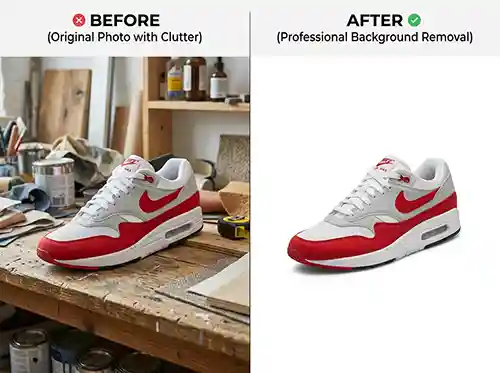
For sellers who photograph simple product categories at predictable volume, AI tools or in-house editing are often sufficient. But there are specific situations where professional editing services deliver a return that justifies the cost.
Complex product categories are the most obvious case. Fine jewelry with thin chains and small clasps, eyewear with transparent frames, products with fur or feathering, glassware, and anything with intricate cutouts or lacework consistently produce poor results with automated tools. The time spent manually correcting AI output on these images often exceeds the time it would take a skilled editor to do it correctly from the start.
Large catalogs with inconsistency problems are another strong case. When a store has accumulated hundreds of product images over time, often from different photographers or different periods, bringing them to a consistent standard requires more than running them through a batch AI tool. It requires editorial judgment applied systematically across the catalog.
Sellers launching on a new marketplace with strict image requirements benefit from professional editing at launch specifically because suppressed listings are costly. Getting the images right the first time avoids the cycle of submission, rejection, correction, and resubmission that delays a listing going live.
If you’re working through a high volume of product images and want consistent quality without building an in-house editing workflow, Clarity Edit handles background removal for ecommerce products across all major categories, with turnaround times that fit into most product launch schedules.
Closing Thoughts
Background removal is a foundational part of ecommerce product photography, not a finishing touch. Done correctly and consistently, it determines whether your images pass marketplace requirements, build buyer confidence, and hold up as your catalog grows.
The most common mistake isn’t using the wrong tool. It’s treating background removal as an afterthought instead of a standard part of the product photography workflow. When it’s planned for from the start, from the way the original photo is taken to the file format of the final output, the results are faster to produce and more consistent across the catalog.
If you’ve read this far, you already know that product image quality isn’t a small detail. It’s what separates listings that convert from listings that don’t. Clarity Edit exists for exactly this: accurate, fast, and affordable background removal for ecommerce sellers who want their images to look right the first time, on every platform, across every product. Get your free quote at clarityedit.com
Frequently Asked Questions
Background removal is the process of isolating a product in a photograph by eliminating everything behind it. The result is a product on a clean white background or a transparent image, ready for use on marketplace listings, product pages, or marketing materials.
On Amazon, yes. The main product image must have a pure white background at RGB 255,255,255. Most other major marketplaces strongly recommend white or light neutral backgrounds for main images, even where it’s not strictly enforced.
AI tools handle simple products well, such as packaged goods, most apparel, and hard goods with clear edges. They struggle with fine jewelry, transparent products, fur and hair texture, and products photographed against backgrounds that closely match the product color. These categories produce better results with human editing.
Review edited images at 100% to 200% zoom before uploading. Look for halo artifacts along edges, missing product detail, and any areas where the background color bleeds through. Do not approve images based on thumbnail previews alone.
JPG for white-background main images on most marketplaces. PNG when you need a transparent background for design flexibility. WebP for your own ecommerce site if the platform supports it.
Most AI tools offer batch processing that can handle hundreds of images in hours. For very large catalogs, API integration allows background removal to run as part of an automated workflow without manual uploads.
For complex product categories, large catalogs, or sellers who don’t have time to manage editing in-house, outsourcing delivers consistent quality with lower total cost than DIY when revision time is factored in.