
How to Create the Ghost Mannequin Effect for Ecommerce Clothing (Complete Guide)
Understanding the Ghost Mannequin Effect
There is a reason clothing images on the best ecommerce sites look the way they do. The garments appear full, shaped, and three-dimensional. They look as if someone is wearing them, but there is no model in sight.
That visual style is known as the ghost mannequin effect, and it has become a standard technique in ecommerce clothing photography.
By removing the mannequin during post-production, brands can present garments in a clean, professional, and realistic way that highlights fit, structure, and design details without the distraction of a visible model or mannequin.
In this guide, you’ll learn what ghost mannequin photography is, how the process works, the equipment and setup required, common editing mistakes to avoid, and how to create professional ghost mannequin images for ecommerce clothing.
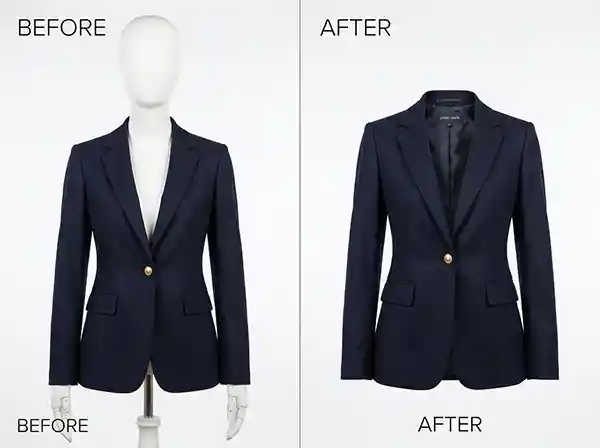
What Is a Ghost Mannequin?
A ghost mannequin is a standard retail or photography mannequin that is later removed from the final image through photo editing. The mannequin is used during the shoot to give clothing its proper shape and structure. Without it, garments tend to look flat, lifeless, or oddly proportioned.
After the shoot, the editor composites multiple images together to erase the mannequin entirely, leaving only the clothing. The result is a hollow, three-dimensional look where the garment appears to be worn by an invisible figure. That’s how the term “invisible mannequin” got its name. Both terms refer to the same technique.
This method became the standard in professional fashion and ecommerce photography because it strikes the right balance — it shows the garment’s true fit and shape without the cost of hiring models and without the distraction a mannequin body would create in the final image.
What Is the Ghost Mannequin Effect?
The ghost mannequin effect is the post-production result of combining two or more product photos into a single seamless image that shows the garment in full, three-dimensional form with no visible support structure.
To put it plainly: you photograph the front of a jacket on a mannequin. Then you remove the mannequin from the jacket and photograph the interior neck label and lining separately. In editing, those images are layered together so the jacket appears to float naturally, shaped as if worn, with its interior details visible and no mannequin in sight.
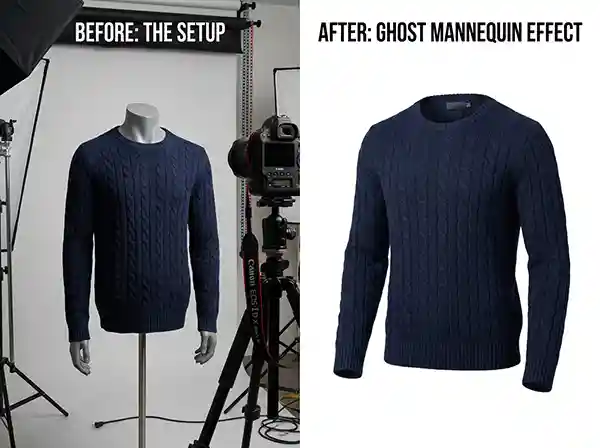
The effect works because it is precise. When done well, the stitching follows its natural line, the seams sit correctly, and the overall silhouette reads as a real, wearable garment. If done poorly, the edges appear cut out, the inner image fails to align properly, and the final result looks pieced together rather than natural. The difference between acceptable and excellent is almost always in the quality of editing.
How Does Ghost Mannequin Photography Work?
The process works in two stages. First, the photography stage. Second, the editing stage.
The Photography Stage
A mannequin is dressed with the garment. The photographer captures the front view, usually at a straight-on angle against a clean background, typically white or neutral grey. Then the garment is removed from the mannequin and laid flat or propped up, and the interior — the neck label, lining, or inner collar — is photographed separately. This interior shot is what allows the editor to fill in the area where the mannequin’s neck or body was visible.
For some garments like jackets, hoodies, or structured dresses, additional shots may be needed for sleeves, back panels, or lower interior sections.
The Editing Stage
This is where skill and precision make the entire difference. The editor uses Photoshop or professional retouching software to:
- Use masking and selection tools to remove the mannequin body from the front image.
- Align the interior shot to match the front image exactly.
- Blend the layers so there are no visible seams, hard edges, or tonal inconsistencies.
- Clean up the final composite, adjust any shadows, and ensure the product reads naturally.
The editing stage is not a quick task. A clean, professional ghost mannequin result requires careful selection work, precise layer alignment, shadow management, and a trained eye for how clothing naturally sits on a body. Rushed editing produces images that look composite. Proper editing produces images that look effortless.

What Are the Types of Ghost Mannequins?
Not all garments are the same, and not all ghost mannequin setups are the same either. Understanding the different types helps you plan your shoot correctly.
Standard Full Body Mannequin
Used for full-length garments including dresses, jumpsuits, coats, and trousers. The mannequin provides a realistic body shape for the complete garment, and the editing involves removing the full mannequin form.
Half Body Mannequin (Top)
Used for tops, shirts, jackets, and knitwear. The mannequin covers the torso and arms only, which simplifies the editing process slightly while still giving the upper garment its proper shape.
Half Body Mannequin (Bottom)
Used for trousers, shorts, skirts, and similar lower-body garments. The mannequin provides correct hip and leg proportions so the garment does not appear shapeless.
Neck Form or Collar Form
Used specifically for T-shirts, polo shirts, and lighter tops where the main concern is the neckline and collar area. These are smaller, focused forms that reduce setup complexity.
Invisible Ghost Mannequin (Specialty)
Some professional photographers use mannequins specifically designed in a way that certain parts are already removable or replaceable, making the editing process more efficient. These specialty mannequins are popular in studios that handle high volume clothing photography.
The right type depends entirely on the garment. Getting this choice wrong at the shoot stage means more editing work later, and in some cases, it affects image quality regardless of how skilled the editor is.
Choosing the Right Mannequin for Different Garments
The mannequin you choose can significantly affect the final result. Structured garments such as blazers and coats often require full-body or torso mannequins, while T-shirts and lightweight tops can be photographed using neck forms or partial-body mannequins.
Using a mannequin that closely matches the garment’s intended fit helps create a more natural shape and reduces editing time during post-production.
How to Shoot Ghost Mannequin Photography: Setup and Best Practices
Getting the photography right is just as important as the editing. A poorly shot garment will produce a poorly edited result, regardless of how talented your editor is.
Lighting Setup
Use soft, even lighting with minimal harsh shadows. Two softbox lights placed at 45-degree angles on each side of the mannequin work well for most garments. The goal is consistent, even illumination across the fabric so the editor has clean, accurate tones to work with. Side lighting that creates dramatic shadows can look great in lifestyle shots but creates editing headaches in ghost mannequin work.
Background
White or neutral grey backgrounds are standard. They make background removal cleaner and produce the consistent white background that most ecommerce platforms expect.
Camera Position and Angle
Shoot straight-on at a consistent height relative to the mannequin. Small angle variations between the front shot and the interior label shot make editing alignment harder. Mark your camera position and do not adjust it between shots for the same garment.
Garment Preparation
Steam or iron the garment before the shoot. Wrinkles and creases can be reduced in post-production but removing them at the shoot stage saves significant editing time and produces a cleaner result. Make sure the garment is properly positioned on the mannequin with natural drape.
Interior Label Shot
Remove the garment from the mannequin and photograph the inside of the neck or collar, ideally against the same background. Keep the garment in the same overall position so the curve of the neckline matches the front image. This is the shot that will be composited into the final image to fill the area where the mannequin was.
How to Create the Ghost Mannequin Effect in Editing
This is where the process comes together. If you are handling editing in-house or working with a professional service, here is what the process actually involves.
Step 1: Open Both Images
Load the front garment shot and the interior label shot into your editing software. In Photoshop, place both images as layers in the same document.
Step 2: Select and Remove the Mannequin
Use the Pen Tool for precise selection of the garment edge, separating it from the mannequin. The Pen Tool gives more control than automated selection tools, particularly at fabric edges, collars, and cuffs. Once selected, create a mask to hide the mannequin while keeping the garment visible.
Step 3: Align the Interior Shot
Reduce the opacity of the interior layer temporarily so you can see through it. Align the curve of the interior neckline to match the opening in the front image exactly. Small misalignments here are noticeable in the final image.
Step 4: Mask and Blend
Restore the opacity and use masking to reveal only the part of the interior shot that fills the mannequin area. Blend the transition so the edge where the two images meet reads naturally. This step takes the most time and is where professional editors earn their value.
Step 5: Clean Up and Refine
Check the entire composite for edge artefacts, tonal inconsistencies, shadow irregularities, and any areas where the mannequin is still partially visible. Adjust levels or curves to ensure the garment colour is consistent across both images.
Step 6: Final Background and Export
Ensure the background is clean and consistent, adjust to the required specification for your platform (most ecommerce sites specify white background with specific pixel padding), and export at the required resolution.
Common Mistakes in Ghost Mannequin Editing
Even experienced teams get some of these wrong. Knowing what to avoid is half the work.
Rough or Unnatural Edges
The most common issue. When the selection around the garment edge is not precise, the clothing looks cut out rather than natural. Fabric textures, loose threads, and fine knit patterns all require careful masking, not just a quick selection.
Interior Shot Misalignment
If the interior label shot is not aligned precisely to the front image, the neckline looks awkward or the inner seam sits at an unnatural angle. This is why consistent camera positioning at the shoot stage matters so much.
Inconsistent Shadows
Removing a mannequin also removes some natural shadow that gives the garment a grounded, three-dimensional quality. Editing that ignores shadow restoration produces images that look strangely flat.
Wrong Colour Balance Between Images
If the front shot and the interior shot were taken under slightly different light, the tones will differ. Matching them in post requires colour grading skill. Unmatched tones make the composite visible immediately.
Over-Smoothing the Fabric
Some editors over-retouch the fabric texture in the process of cleaning up artefacts, resulting in garments that look plastic or unnatural. Fabric should look like fabric.
Ghost Mannequin vs Flat Lay vs Model Photography
| Method | Shows Shape & Fit | Cost | Scalability | Best Use Case |
|---|---|---|---|---|
| Ghost Mannequin | Excellent | Moderate | High | Ecommerce product catalogs |
| Flat Lay | Limited | Low | High | Casual apparel and social media |
| Model Photography | Excellent | High | Moderate | Fashion campaigns and branding |
Ghost mannequin photography sits between flat lay and model photography. Flat lays are affordable but often fail to show a garment’s true shape. Model photography creates a realistic presentation but requires additional costs for talent, styling, and production. Ghost mannequin images offer a practical balance by presenting garments in a three-dimensional form while remaining consistent, scalable, and cost-effective for ecommerce catalogs.
Why the Ghost Mannequin Effect Matters for Ecommerce
In ecommerce, customers rely heavily on product images because they cannot touch or try on a garment before purchasing. Ghost mannequin photography helps fill that gap by presenting clothing in a realistic three-dimensional form while maintaining the clean, distraction-free look expected in modern online stores.
Compared with flat lay photography, ghost mannequin images provide a clearer sense of fit and structure. They also offer a more scalable and cost-effective solution than model photography, making them ideal for growing apparel brands and large ecommerce catalogues.
Brands that invest in properly executed ghost mannequin photography typically see stronger add-to-cart rates and fewer returns. When a customer understands the true fit and silhouette of a garment from the image, they are buying with better information. That reduces the “this doesn’t look like the picture” return reason that costs ecommerce brands significant money every year.
Consistency matters too. A catalogue where every garment is presented with the same angle, same background, and same editing quality communicates professionalism. Shoppers notice inconsistency even when they cannot name it. A well-edited product page simply feels more trustworthy.
Practical Example: How a Jacket Is Ghost Mannequin Edited
Here is a realistic scenario. A brand has 50 winter jackets that need ghost mannequin editing for their seasonal launch.
The photographer drapes each jacket on a male torso mannequin and shoots the front and back on a white background. The interior lining and neck label of each jacket is then shot separately. For structured jackets, the cuff and collar area gets a third interior shot to ensure the editing has enough reference material.
The editing team receives the images with a brief: white background, consistent shadow, neck opening fully filled, no mannequin visible, and output files at 2000 x 2000 pixels in sRGB for platform upload.
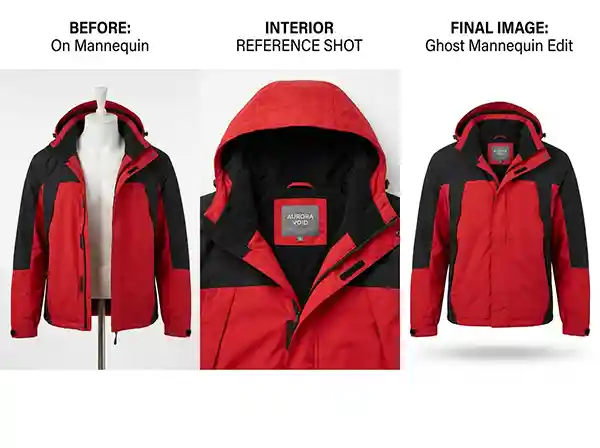
Each jacket goes through masking, interior alignment, shadow work, and a quality check pass. The final catalogue looks unified. Every jacket appears shaped, wearable, and professionally presented. The brand uploads the season and the product pages look the way they intended.
That is what a properly managed ghost mannequin workflow produces. It is not just one image — it is a reliable, scalable system.
Expert Tips for Better Ghost Mannequin Results
- Shoot the interior shot before you pack away your lighting. It sounds obvious, but many photographers finish their front-facing shots and then try to recreate the interior shot later in different conditions. Keep everything consistent in a single session.
- Use a mannequin that fits the garment correctly. A mannequin that is too small or too large distorts the garment’s natural silhouette and produces editing problems that no amount of post-production can fully fix.
- Communicate clearly with your editing team. If you have specific platform requirements, shadow preferences, or branding guidelines, share them upfront. Professional editors can match any output specification, but they need clear direction to do it efficiently.
- Brief your photographer on the editing requirements. A photographer who understands that interior shots need to align with the front image will naturally be more careful about camera position and garment positioning. Shoot-to-edit communication reduces rework.
- Do not neglect the back shot. For many garment types, a ghost mannequin back view shot is just as valuable as the front. Shoppers want to see the full picture.
Conclusion
The ghost mannequin effect is one of those techniques that looks effortless when it is done right and immediately noticeable when it is not. It requires care at both the shoot and edit stages, and the brands that invest properly in the process tend to produce product catalogues that look and perform significantly better than those that cut corners.
If you are building a clothing brand, managing an ecommerce catalogue, or working as a photographer who wants to offer better results to apparel clients, understanding how to create the ghost mannequin effect — from setup through to final composite — is genuinely worth your time.
At Clarity Edit, we handle ghost mannequin editing as part of a broader commitment to product image quality that serves real business outcomes. Every garment, every layer, every edge gets the attention it needs. Not because that is what we say, but because that is what proper editing actually requires.
Creating professional ghost mannequin images requires both accurate photography and precise post-production. If you need consistent, high-quality results without building an in-house editing workflow, professional editing support can save significant time and effort.
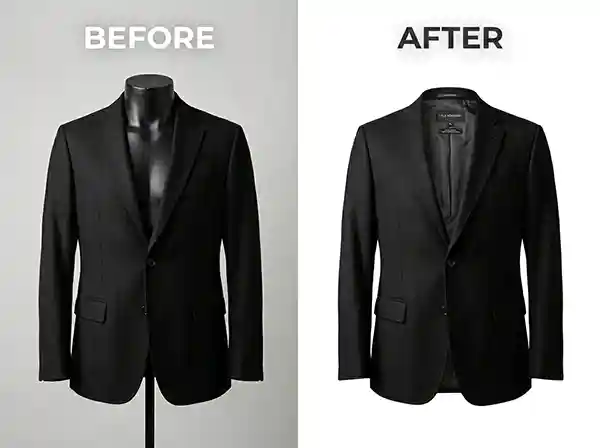
Ready to See the Difference Professional Ghost Mannequin Editing Can Make?
Send us a sample image and get a free quote. Our team will assess your requirements, walk you through our process, and give you a clear picture of what to expect. Whether you have 10 garments or 10,000, we are set up to deliver consistent, high-quality results at the turnaround time your business needs.
[Get Your Free Quote Today] [Contact Us]
Frequently Asked Questions
Technically, yes. Some photographers use flat lay methods and then use editing to add dimension, or they photograph the garment on a model and remove the model in post. Neither method produces results as clean or as consistent as a properly shot ghost mannequin setup. For high-volume or catalogue-level work, using an actual mannequin is almost always worth it.
For a professional editor, a single garment image typically takes between 20 and 45 minutes depending on complexity. A structured jacket with a lining requires more alignment work than a basic T-shirt. Professional editing services can typically process 50 to 100 images within 24 to 48 hours for large-volume orders.
Clipping path is the technique used to cut out a subject from its background with precision. It is part of the ghost mannequin process but not the same thing. Ghost mannequin editing involves multiple images, composite layering, and interior fill work. Clipping path is a component within that workflow.
For a proper ghost mannequin edit, yes. The interior shot is what allows the editor to fill the area where the mannequin’s neck or body was visible. Without it, the editor either has to artificially create the interior (which rarely looks natural) or the neckline area is left open, which is not how finished ghost mannequin images should appear.
It works well for most apparel including jackets, shirts, dresses, trousers, knitwear, and activewear. Very transparent or sheer fabrics, heavily embellished garments, or items with unusual structures may require additional editing care. A good editing service will assess the garment type and adjust the workflow accordingly.