
How to Retouch Product Photos for eCommerce Like a Professional — A Real-World Guide
Retouching Product Photos the Professional Way
There’s a moment that every online shopper knows all too well. They land on a product page, and something just feels off. The photo looks washed out, or the background is slightly grey instead of clean white, or the product edges look rough and rushed. They can’t always name exactly what’s wrong. They close the tab and continue browsing elsewhere.
That moment costs brands real money every single day.
Product photo retouching is one of those things that most sellers underestimate right up until they see the difference it makes. And once you see it, you can’t unsee it. A well-retouched product image isn’t just prettier. It communicates quality. It builds trust before a single word of copy is even read. It makes the shopper feel like they’re dealing with a brand that takes its work seriously.
This guide covers how to retouch product photos for eCommerce like a professional, not in theory, but in the way it’s actually done when quality standards genuinely matter. Whether you’re editing in-house or deciding whether to work with a professional retouching service, understanding the process gives you the clarity to make smarter decisions for your brand.
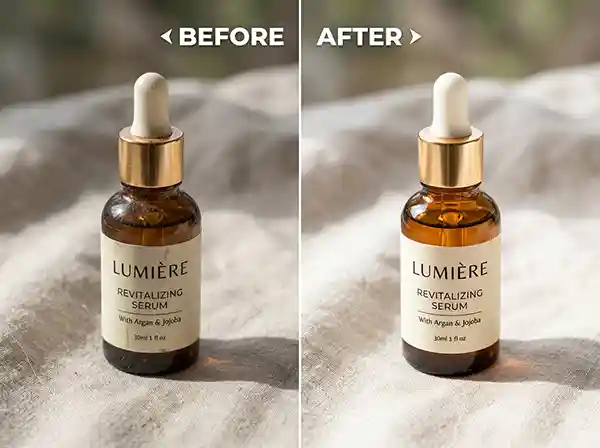
What Is Product Photo Retouching?
Product photo retouching is the process of correcting, cleaning, and enhancing product images after they’ve been shot, so they look accurate, polished, and visually compelling for online presentation.
That definition sounds simple, but the work involved can range from a quick colour correction to a complex multi-layer editing session that transforms a mediocre image into something that genuinely sells.
It’s worth separating retouching from basic editing. Basic editing might mean adjusting brightness or cropping. Retouching goes further: removing dust particles from a leather bag, evening out the tone of a fabric, cleaning up reflections on a glass bottle, correcting colour accuracy for jewellery, or smoothing surface imperfections on a product without making it look fake. The goal isn’t to deceive. It’s to show the product as it truly is, without the distractions that cameras and lighting conditions introduce.
For eCommerce specifically, retouching also involves preparing images for platform requirements. Amazon, Shopify, Etsy and other platforms have image standards around background colour, resolution, and file format. A professional retouching workflow handles all of that consistently.
Why eCommerce Product Photo Retouching Matters More Than Most Brands Realise
Most eCommerce brands know their photos matter. Fewer understand exactly how much.
When a shopper can’t hold a product, touch it, or experience it in person, your images become the entire sensory experience. They are your fitting room, your showroom floor, and your customer service rep all at once. If they’re doing their job well, shoppers feel confident. If they’re not, shoppers hesitate, and hesitation almost always means they leave.
There’s also a brand perception dimension that often goes unspoken. A shopper comparing two similar products will instinctively trust the brand whose images look more professional. They don’t consciously think “that photo has better light falloff management.” They just feel like one brand seems more credible. That feeling drives clicks, add-to-carts, and completed checkouts.
The brands that invest in consistent, professional eCommerce product photo retouching see this reflected in their conversion rates. It’s not magic. It’s just that quality images remove doubt, and removing doubt is what turns browsers into buyers.
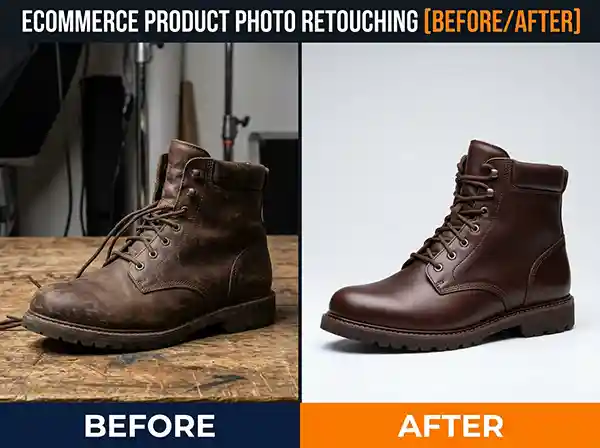
How to Retouch Product Photos for eCommerce Like a Professional
This is where we move into the actual process. Professional product photo retouching follows a structured process to ensure every detail is addressed and the final image meets both visual and technical requirements.
Step 1: Evaluate the Raw Image Before Touching Anything
Before opening Photoshop or Lightroom, a professional retoucher takes a moment to assess what they’re working with. What are the main issues? Is the lighting flat? Are there distracting shadows? Does the colour look accurate? Is the background removable cleanly or will it need masking?
This assessment shapes the entire workflow. Jumping straight into editing without a clear picture of what needs fixing leads to wasted time and inconsistent results. Professional retouchers develop an eye for this quickly, but it’s a habit anyone can build.
Step 2: Background Removal and Cleanup
For most eCommerce images, step one in the actual editing process is isolating the product from its background. This is usually done with a clipping path for hard-edged products like electronics, shoes, or packaged goods, and image masking for softer edges like fabric, hair, or fur products.
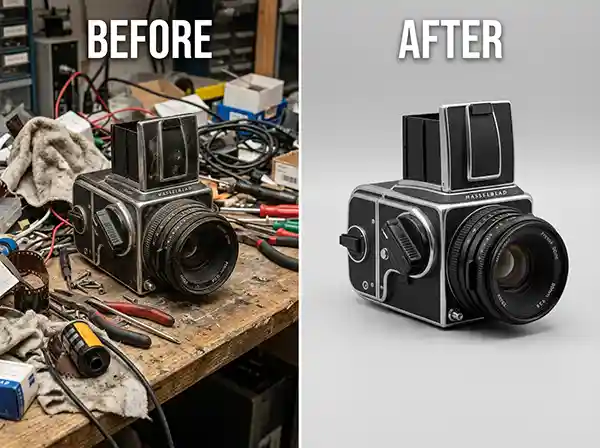
A clean background removal is more technically demanding than it looks. Poorly cut edges, fringing (where a bit of the old background colour bleeds into the product edge), and rough silhouettes all signal unprofessional work. When done well, the product looks natural whether it’s placed on a white background, a lifestyle setting, or a transparent PNG.
White backgrounds (specifically pure white at RGB 255, 255, 255) are required by Amazon and most major marketplaces. Getting that right while keeping the product looking natural, rather than flat and sterile, is part of the craft.
Step 3: Colour Correction and Colour Accuracy
Cameras lie. Not intentionally, but they do. The way a camera reads and renders colour is affected by lighting conditions, white balance settings, lens characteristics, and sensor sensitivity. The result is that a product that looks rich burgundy in person might photograph as muted maroon, or a white fabric might photograph with a warm yellow cast.
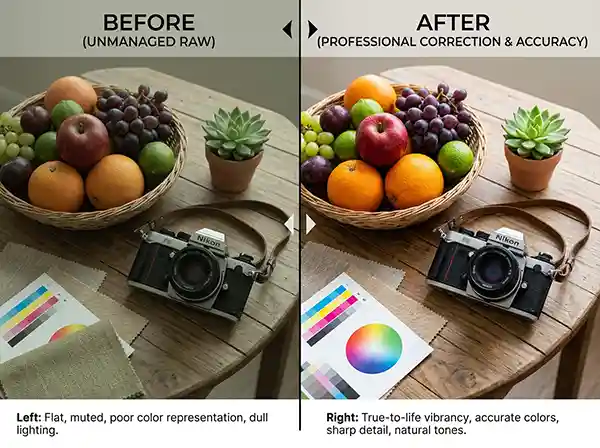
Colour correction fixes these discrepancies so the product in the image matches the product in real life. For apparel and fashion brands, this is genuinely critical. Returns driven by colour inaccuracy are one of the most common and costly eCommerce problems, and they’re largely preventable with proper colour management in post-production.
Professional colour correction uses calibrated monitors, colour reference tools, and careful attention to both the highlights and shadows to ensure accurate, consistent results across an entire product catalogue.
Step 4: Exposure and Lighting Adjustments
Even well-shot product photos often have minor exposure issues: a slightly overexposed highlight that loses detail, or a shadow area that’s too dense to see the product clearly. Retouching addresses these through targeted adjustments rather than blanket corrections.
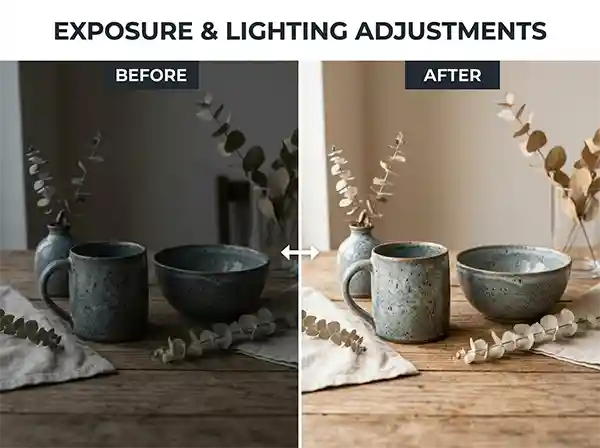
The goal is to reveal the product fully, showing texture, material, and form, without making the image look artificially lit or over-processed. This balance is one of the things that separates professional retouching from amateur editing. Amateur editing often overcorrects. Everything ends up looking too bright, too sharp, and somehow less real than the original. Professional retouching is more restrained and intentional.
Step 5: Surface Retouching and Detail Cleanup
This step involves removing any distractions that don’t belong: dust on lenses, fingerprints on products, loose threads on clothing, scratches on packaging, water spots on glassware, and similar small imperfections that only appear clearly in high-resolution photography.
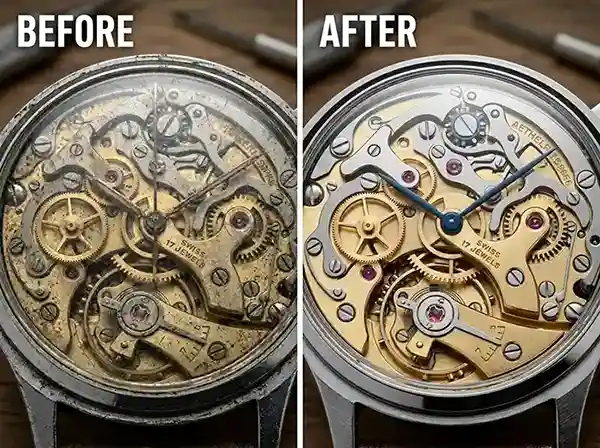
Surface retouching is painstaking work. It requires zoom-level inspection of every area of the image and careful use of tools like the Clone Stamp, Healing Brush, and frequency separation (a professional technique that allows retouching texture and tone independently). Done well, it’s invisible. The viewer simply sees a clean product. Done poorly, it looks smudged or artificially smooth.
For fashion and apparel, this step also includes fabric smoothing, removing unwanted wrinkles, and making garments look as they would when properly worn or displayed.
Step 6: Shadow Creation and Depth
Removing a background and placing a product on pure white can make it look like it’s floating. A proper shadow, whether a natural drop shadow, a reflection shadow, or an original shadow that mimics how the product would sit in real lighting, grounds the image and makes it feel three-dimensional and real.
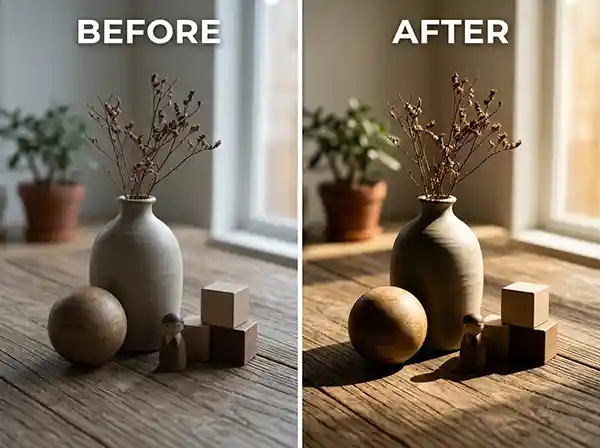
Shadow work is often overlooked in basic retouching tutorials, but it’s one of the finishing details that makes images look genuinely professional versus just cleaned up.
Step 7: Sharpening and Final Export
The last step is output optimization. Product images need to be sharp at the sizes they’ll be displayed but not over-sharpened in a way that creates harsh haloing around edges. Sharpening is applied subtly and usually done last, after all other adjustments are complete.
Export settings matter too. Image format (JPEG vs PNG), resolution (72 DPI for web, 300 DPI for print), file size (large enough for quality, small enough for fast load times), and colour profile (sRGB for web) all need to be handled correctly. A beautifully retouched image that loads slowly on a mobile product page is still costing you conversions.
Common Product Photography Mistakes That Retouching Has to Fix
Understanding what goes wrong during the shoot helps explain why retouching is so consistently necessary.
Inconsistent lighting across a product line.
When products are photographed on different days or with slightly different setups, the tonal quality of the images shifts. Retouching helps maintain consistency across images, ensuring the catalogue feels cohesive.
Wrong white balance.
Indoor lighting without proper correction gives products a warm, orange cast. Retouching fixes this, but it’s cleaner when caught at source.
Flat, directionless lighting.
Product photos need some contrast and dimensionality to look interesting. Flat lighting makes everything look cheap, regardless of the product’s actual quality. Retouching can add contrast and light direction to recover some depth, though it can’t fully replace a better lighting setup.
Shooting on non-white or textured backgrounds.
Any background that isn’t pure white or neutral grey creates extra retouching work during background removal. Sometimes the extra complexity affects edge quality.
High ISO noise.
Shooting in low light at high ISO settings introduces digital noise (grain) into the image. Noise reduction is part of a professional retouching workflow, but severe noise is difficult to fully correct without affecting sharpness.
How Professional Product Photo Retouching Differs from DIY Editing
Editing your own product photos is absolutely possible, and many small business owners start exactly that way. The gap between DIY results and professional retouching comes down to a few consistent factors.
Tools and software knowledge matter, but they’re not the biggest differentiator. Professional retouchers have developed the ability to see problems that most people miss and make corrections that are invisible rather than obvious. They’ve built calibrated visual judgement through thousands of hours of work.
Consistency across large volumes of images is the other major factor. Editing fifty product images one by one with a casual workflow produces fifty slightly different-looking images. A professional retouching service applies standardised settings, visual consistency checks, and quality control at every stage. The result is a product catalogue that looks cohesive and intentional.
For brands that are scaling, that consistency becomes genuinely important. A disjointed visual experience across your product pages undermines the brand trust you’re trying to build with each individual image.
What Happens When You Outsource Product Photo Retouching
When clients send images to a professional retouching team like ours at Clarity Edit, the first thing that happens is a file and brief assessment. What platform is the imagery for? What background treatment is needed? Are there specific colour accuracy requirements? Is there a reference image showing the style that’s expected?
These questions matter because professional retouching isn’t one-size-fits-all. An Amazon product listing has different technical requirements than an editorial fashion image. A jewellery retouch requires different attention than a furniture image. Understanding the end use before touching the file is what makes the output actually useful rather than just technically adequate.
Turnaround is another practical concern clients often ask about. For standard eCommerce retouching, professional services typically deliver within 24 to 48 hours. Larger catalogues or more complex work takes longer, but a reliable service sets expectations clearly upfront and doesn’t miss them.
Revision communication is equally important. Even with excellent briefing, visual interpretation can vary. A professional service handles revision requests clearly and without friction, because the goal is for the client to have images they can use with confidence.
Retouching Mistakes That Undermine Image Quality
Over-smoothing surfaces.
This is one of the most common issues in amateur retouching. Trying to make a product look perfect by heavily smoothing every surface removes the texture and tactile quality that tells a shopper what they’re actually buying. A leather wallet should still look like leather. A knitted sweater should still have visible fibres.
Inconsistent shadow treatment.
Adding drop shadows to some products but not others, or using different shadow styles across a catalogue, creates a disjointed visual experience that subtly signals a lack of professionalism.
Inaccurate colour.
Pushing saturation or contrast to make images “pop” without checking against actual product colour is a mistake that leads to customer returns and negative reviews.
Cutting paths that are too tight or too loose.
A clipping path that’s even slightly inside the actual product edge creates a trimmed, unnatural look. One that’s slightly outside leaves a halo of the original background. Neither is acceptable in professional work.
Ignoring platform specifications.
Retouching without knowing the destination platform’s technical requirements leads to images that get rejected, look wrong, or load poorly.
Professional Standards Worth Knowing About
Work non-destructively.
In Photoshop, use adjustment layers rather than applying changes directly to the image. This means every decision can be revised later without starting over.
Calibrate your monitor.
Colour work done on an uncalibrated monitor is unreliable. What looks correct on one screen can look very different on another. Professional retouchers use calibrated displays and reference against known colour values.
Create a consistent editing recipe for product lines.
If you’re shooting a consistent product type (apparel, for example), develop a base set of adjustments that apply to all images before item-specific corrections. This dramatically improves speed and consistency.
Always retouch at full resolution.
Scaling down too early and retouching a small file means the edits won’t hold up when the image is displayed at full size on a product page. Work at the highest resolution available.
Keep original files archived separately.
Raw files and original images should always be preserved in their untouched form. Retouching is sometimes needed again as platform requirements change or brand visual standards evolve.
Develop a QC checklist.
Before any image is marked as finished, it should be checked against a consistent list: background cleanliness, edge quality, colour accuracy, exposure balance, surface cleanliness, shadow naturalness, and export spec compliance. Skipping QC is where small errors slip through and create client problems.
CONCLUSION
Good product photography gets you halfway there. What you do with those images in post-production determines whether they actually do the job they need to do.
Knowing how to retouch product photos for eCommerce like a professional means understanding that every element of the image carries a message. The background cleanliness signals care. The colour accuracy signals honesty. The shadow work signals visual quality. The edge sharpness signals precision. Shoppers don’t consciously read these signals, but they respond to them.
Whether you’re retouching in-house or partnering with a professional editing service, the principles are the same: work systematically, prioritise accuracy over flashiness, maintain consistency across your catalogue, and always edit with the end shopper in mind.
For brands that are serious about image quality and what it means for customer trust and conversions, professional retouching isn’t an optional extra. It’s a foundational part of how your products are perceived online.
Ready to See What Professional Retouching Looks Like for Your Products?
At Clarity Edit, we work with eCommerce brands, online retailers, photographers, and agencies who care about image quality and what it costs them when it’s not right. Our retouching team handles everything from background removal and colour correction to complex jewellery retouching and full catalogue editing workflows.
Send us a few test images and see the difference before committing to anything. No guesswork, no risk.
Or Try a Free Sample Edit and see exactly what we’d do with your product images.
Frequently Asked Questions
Product photo retouching is a detailed post-production process that corrects, cleans, and enhances product images for professional use. Basic photo editing typically covers broad adjustments like brightness, contrast, or cropping. Retouching goes further, addressing specific issues like surface imperfections, colour inaccuracies, background inconsistencies, edge quality, shadow work, and platform-specific technical requirements. The goal of retouching is to produce an image that is both visually accurate and commercially effective.
Consistent natural lighting (indirect window light works well), a clean neutral background, and a camera or smartphone with a good sensor can produce usable raw images. The gap between a basic setup and a professional result is largely closed in post-production. Proper retouching corrects lighting inconsistencies, removes background distractions, fixes colour, and outputs images that meet professional standards, regardless of how modest the original setup was.
The most damaging mistakes include inconsistent colour across a product catalogue, dirty or cluttered backgrounds, flat or uneven lighting that makes products look cheap, blurry or low-resolution images, and not meeting the technical specifications required by platforms like Amazon or Shopify. Most of these issues are correctable in retouching, but they add time and cost compared to getting the shoot right from the start.
For standard eCommerce retouching (background removal, colour correction, surface cleanup, shadow work), professional services typically deliver within 24 to 48 hours for moderate volumes. Complex retouching work, like jewellery with reflective surfaces or multi-layer composite images, takes longer. At Clarity Edit, we provide clear turnaround estimates before work begins, so there are no surprises.
It depends on volume, skill level, and time. Learning basic retouching is genuinely worth doing if you’re editing a handful of images occasionally. For brands publishing dozens or hundreds of product images regularly, outsourcing to a professional service is almost always more efficient, produces more consistent results, and frees up time for the parts of the business that actually require your direct attention. The cost of professional retouching is usually recovered quickly in improved conversion rates and fewer returns from colour or quality misrepresentation.